Label Printer Handbook
  • Home
  • Reviews
    • Office label makers
    • Shelf and product label printers
    • Shipping label printers
  • Best
    • Office label makers
    • Shelf and product label printers
    • Shipping label printers
  • Guides
    • Office label makers
    • Shelf and product label printers
    • Shipping label printers
  • Comparisons
    • Office label makers
    • Shelf and product label printers
    • Shipping label printers
  • Favorites
Search

Brady M210 vs BMP21-PLUS: should you replace a working printer?

Keep a working BMP21-PLUS for proven continuous wraps. The M210 earns a closer look when you need pre-sized labels or a material gauge. Check the Authentic mark on your existing cartridges before pricing the switch.

Sorting printer cartridges on a workbench

Which model fits your setup?

Use the stock you own

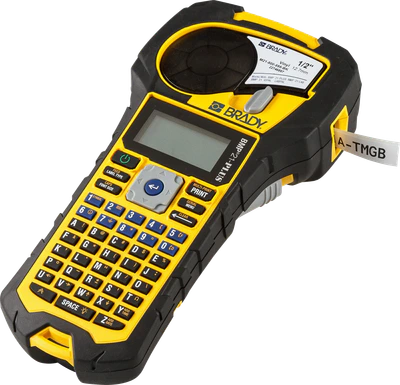
Brady BMP21-PLUS

Controls
ABC keypad and LCD
Refill format
Compatible continuous Brady cartridges
View details ↓ Check price on Amazon↗
Change at reorder

Brady M210

Controls
Onboard keyboard and LCD
Refill format
Compatible M21 cartridges
View details ↓ Check price on Amazon↗

Empty the cartridge drawer before replacing the printer

Set aside the cartridge you used on your last successful job. If your BMP21-PLUS still prints a readable cable wrap with it, you already have a working combination. The strongest reason to change is a specific job the old machine cannot finish, such as printing on a supported pre-sized label. Retirement alone does little to change the next wrap.

  1. Read the cartridge itself. Record its M21 part number and look for the Brady Authentic A. Brady says a BMP21-PLUS cartridge can work in the M210 when it has that mark. Check the exact material against the M210 list.
  2. Separate older stock. Keep cartridges of uncertain compatibility beside the working machine. A technician in an electrician forum described discovering the missing mark only after switching printers. Counting unopened boxes by width would have missed that cost.
  3. Name the missing job. Identify the pre-sized label you need, or the run where knowing the remaining stock would change what you pack. Check one marked cartridge and one finished print before moving the rest of the drawer.

What changes at the bench?

Decision BMP21-PLUS M210
Repeat an existing wrap Use the proven continuous cartridge and saved layout. Check cartridge recognition and recreate a sample before switching.
Use a pre-sized label The manual specifies continuous supplies. Supports compatible die-cut stock as well as continuous media.
Estimate stock before a run Keep the spare used on the current job. The onboard material gauge helps decide when to pack another cartridge.

A failed print does not always mean a failed printer

BMP21-PLUS listing feedback describes self-laminating IDs surviving a studio move, including coiling and relocating cables. Another useful detail from the same account was tape feeding blank after a cartridge ribbon broke. If a familiar layout suddenly comes out blank, try a known-good compatible cartridge before replacing the machine. That distinguishes a consumable problem from a recurring printer fault.

If the frustration is typing long lists, both units still put the alphabet on the handheld. Owners liked the BMP21-PLUS display and saved files, but some found its alphabetic layout and manual cut awkward at a desk. Moving to the M210 buys neither desktop list import nor automatic cutting. The M210 vs M211 comparison addresses that different purchase.

Check the US package before budgeting for power

The retired BMP21-PLUS listing identifies the yellow-and-black base printer and excludes batteries, cord and lithium pack. Its title mentions a cartridge while the listing bullets describe cartridges sold separately. Brady’s standard manual identifies an M21-750-499 starter. Confirm what the remaining seller actually supplies. For the replacement, the M210 base-unit review covers the six-AA setup and optional rechargeable pack.

Use the stock you own

Brady BMP21-PLUS

Check price on Amazon↗

Use the last good cable wrap as a reference. If a known-good cartridge still prints it clearly, keep the old machine in service for that material.

Tape widths
Up to 0.75 in (19.1 mm)
  • Retired model with continuous media

Best if

  • You have useful continuous stock and the current wrap survives handling.

Skip if

  • The required label is pre-sized and your shop needs to run it now.
Specifications
Product typeHandheld industrial label maker
InputABC keypad and LCD
Label mediaCompatible continuous Brady cartridges
Accepted tape widthsUp to 0.75 in (19.1 mm)
CutterManual
Power supplySix AA alkaline cells or optional pack / adapter
Reviewed US packageYellow-and-black base unit. Listing title specifies a cartridge. Power accessories excluded.
Change at reorder

Brady M210

Check price on Amazon↗

Separate marked cartridges from older or uncertain stock before moving the team to the replacement. Check one exact part number against the new printer.

Tape widths
Up to 0.75 in
  • Brady Authentic marking matters

Best if

  • A specific compatible die-cut label or stock gauge solves a recurring problem.

Skip if

  • Your main complaint is entering a long list at the handheld.
Specifications
Product typeHandheld industrial printer
InputOnboard keyboard and LCD
Label mediaCompatible M21 cartridges
Accepted tape widthsUp to 0.75 in
CutterManual with label retention
Dimensions (H × W × D)9.5 × 4.5 × 2.5 in
Power supply6 AA alkaline cells, optional lithium-ion pack or AC adapter
Reviewed US packageStandard M210. Brady lists M21-750-499 nylon cloth and quick-start guide. Amazon does not itemize accessories.

What prompted the replacement search?

One cartridge feeds blank

Try the known-good cartridge from the last successful job and check which material you actually need.

Check the cable label format

We need a pre-sized label

Identify the refill SKU and power requirements for the base printer before placing the order.

Check the M210 setup

We spend too long typing lists

Compare a mobile file workflow with keypad entry before replacing one keyboard model with another.

Compare the two workflows

×
Label Printer Handbook

Printer reviews and buying guides for filing, labeling merchandise and packing orders.

Browse the guide

  • Home
  • Reviews
  • Best
  • Guides
  • Comparisons
  • Favorites

Printer categories

  • Office label makers
  • Shelf and product label printers
  • Shipping label printers
As an Amazon Associate I earn from qualifying purchases.
About Contact Privacy policy Image credits Affiliate disclosure